 DARK MATTER
ERP and operations · 6 min read · Updated
How do I move from Excel to a custom system without losing my data?
Short answer
To move from Excel to a custom system, first your spreadsheets are organized, you decide which process moves first, and the system is built in phases while you keep working as you do today. Your data is cleaned and loaded into the new system before anyone uses it, so you do not start from zero. It makes sense once several people edit the same files, reconciliations take days or a formula error has already cost you money.
Also asked as
- When is it time to stop using Excel in my business?
- How do I move my spreadsheets into a system or a database?
- How much does it cost to replace Excel with custom software?
Signs Excel is no longer enough
- Several people edit the same file and nobody knows which version is the right one.
- Closing cash, payroll or inventory takes days of copying and pasting.
- A broken formula or a deleted cell has already changed an important number.
- You need each person to see only part of the information and Excel cannot do that well.
- Reports depend on one person who knows how the file works.
When Excel is still enough
If one person keeps the file, the data is small and nobody else needs it in real time, Excel or Google Sheets can keep working. Moving makes sense when the file has become a piece of the operation that others use every day, not when you simply want it to look tidier.
How your data moves into the new system
First your sheets are reviewed: repeated columns, duplicate records, dates written several ways and formulas that hide business rules. Then the data is cleaned, loaded into the system in a test environment and you compare it against your real numbers before go-live. The original files are kept as a backup.
In phases, without stopping your operation
You do not have to switch everything at once. You start with the process that costs the most time or errors, for example cash reconciliation or inventory, and the remaining sheets are replaced later. During the transition your team keeps selling and serving customers as usual.
What you gain compared with keeping spreadsheets
- One version of the information, with roles and permissions per person.
- Automatic calculations that no longer depend on a fragile formula.
- Real-time reports, exportable to PDF and Excel for your accountant.
- A record of who changed what and when.
- Alerts, such as low inventory, that a spreadsheet will not send by itself.
What drives the cost and how to start
The investment depends on how many files and processes are replaced, how many users and roles there are, how much data must be migrated and how clean it is, and which integrations are needed, for example with your accounting. We don't give a number without knowing your case: we first run a free assessment, review your real spreadsheets and deliver a written proposal with scope, phases, timeline and investment.
How we solved it
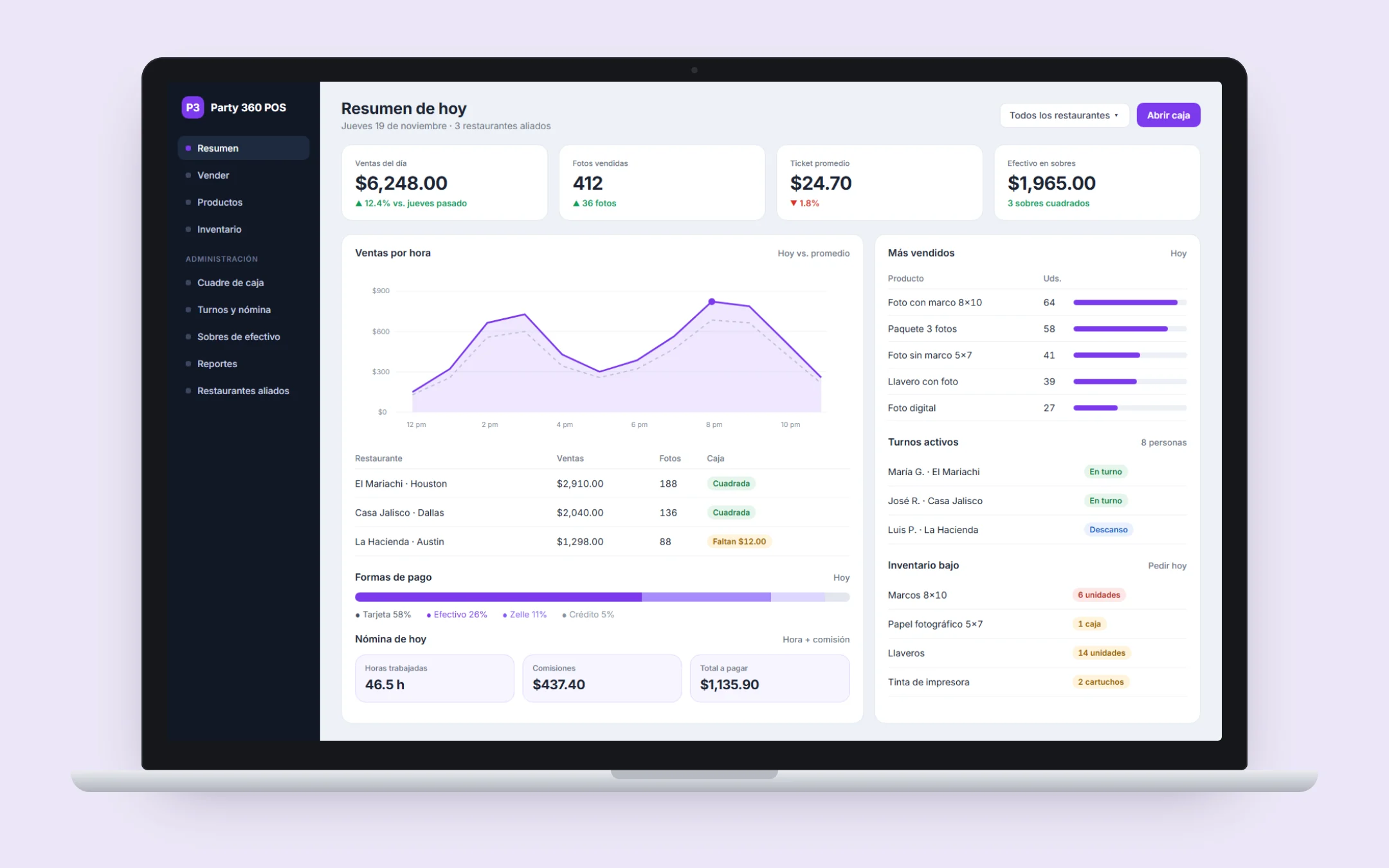 HospitalityParty 360 POSParty 360 tracked sales, staff hours and cash across many venues in spreadsheets, and payroll and cash reconciliation were slow and error-prone. We built a POS and operations platform where every shift, sale, payout and cash envelope is recorded and reported in one place, with hourly-plus-commission payroll, inventory with low-stock alerts and reports exportable to PDF and Excel.See the project →
Illustrative image with sample data; the real screens are private to the client.
Related questions
Do I lose my Excel data when I migrate?
No. The data is cleaned and loaded into the new system, validated against your real numbers before use, and the original files are kept as a backup.
Can I still export to Excel after migrating?
Yes. The system's reports can be exported to Excel or PDF for your accountant or your own reviews.
How much does it cost to replace Excel with a custom system?
It depends on the processes, users, data to migrate and integrations. After the free assessment we deliver a written proposal with the scope and the investment.
Does your business have this question?
Walk us through your operation in a free assessment and get a written proposal with scope, phases, timeline and investment.
Keep reading
ERP and operations · 6 min readShould I get a custom sales dashboard or use Power BI?A custom sales dashboard makes sense when your numbers come from your own system, each person must see only their part, or reports must update in real time without anyone building them. Power BI and similar tools are enough if your data already sits in order in a few sources and someone can maintain the reports. The decision depends on where your data originates, who looks at it and how often it changes.Read the answer → ERP and operations · 6 min readWhat gym management software do I need for memberships, classes and access?The gym management software you need should keep memberships with their expiry dates, class booking, payments and each member's profile in one place. An off-the-shelf tool is enough with one location and standard plans; custom pays off when you run several locations, have your own packages or payment rules, or want to offer the system to other gyms.Read the answer →
 ERP and operations · 6 min readWhat is a custom ERP, and is it worth it for a small business?A custom ERP is a management system built around your company's processes: sales, inventory, production, purchasing, billing and reports on one platform. It pays off for a small business when its way of working does not fit an off-the-shelf ERP without paying for unused modules or still relying on spreadsheets.Read the answer →